Unicode greatly enhances the interoperability of information,
removing the very problematic need to associate a character set with your data.
You really should make an effort to use it when possible.
Unicode in combination with standard presentation languages like xhtml
will obviate the need for proprietry information formats like
Microsoft Word for example. For info on unicode implementation details,
see Markus Kuhn's great unicode and UTF-8 FAQ.
Here is another presentation of these common unicode characters,
enclosed using the box drawing characters. I.E. the following is
not a html table. You can cut & paste this box as a template.
Character encodings
Joel Spolsky has a nice timeline summary of character encodings, and how we got to unicode and UTF8. I started using unicode as of red hat 9, where it was enabled by default. Everything just worked™. For the record my LANG environment variable is set to en_IE.UTF-8 I think it's worth mentioning how windows, since it's so ubiquitous, handles unicode. Windows in english speaking and western european countries uses the non unicode windows-1252 (ms-ansi) charset. This is iso-8859-1 plus some other NON standard stuff. It's nothing to do with ANSI. See the recode section here for examples to convert between this and utf8. How notepad handles unicode is useful info also.Character selection
It's worth noting first, commonly confused characters which is more of a problem with the greater selection of characters available in unicode. To help finding characters, here is a handy online unicode browser, which one can use to select characters for copying and pasting. However for commonly used characters it's much better to input them directly rather than using copy and paste, and here is some info on extended character entry on x windows. As an interim, one could use a character picker applet, like the gnome one on Linux shown below. You can populate it by pasting from this page or the excellent gnome-character-map for e.g. Once you click on your required character it's copied to the clipboard for pasting into the application of your choice.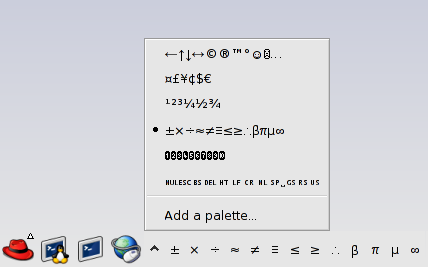
$ gconftool-2 -R /apps/panel/applets | grep chartable chartable = [←↑↓→↔©®™°☺☹…,¤£¥¢$€,¹²³¼½¾,±×÷≈≠≡≤≥∴βπµ∞,➊➋➌➍➎➏➐➑➒➓,␀␛␈␡␉␊␍␠␣␝␞␟,─│┌┐└┘├┤┬┴┼] |
┌──────────────┬─────────────┐ │←↑↓→↔ │¤£¥¢$€ │ ├──────────────┼─────────────┤ │©®™°☺☹… │¹²³¼½¾ │ ├──────────────┼─────────────┤ │─│┌┐└┘├┤┬┴┼ │±×÷≈≠≡≤≥∴βπµ∞│ ├──────────────┼─────────────┤ │␀␛␈␡␉␊␍␠␣␝␞␟ │➊➋➌➍➎➏➐➑➒➓ │ └──────────────┴─────────────┘
© Feb 23 2006